 Hullspark
Your first label merge with Label Sweep
Two labels for one idea split your pages in two. A search by label then misses some of them. Label Sweep finds these labels and merges them. Four steps and about 10 minutes. Nothing changes until you press Run.
Anyone can open the app and do a dry run. Only a Confluence administrator can run a change.
The pictures are real screens from a test site. Names and numbers are examples. Click a picture to enlarge it.
Install
Install Label Sweep from the Marketplace listing. Choose your Confluence site.
You’ll see: Label Sweep in the Apps menu. Changes need a free trial or a subscription. Without one the app is read-only.
-
1Open the app
Click Apps and then Label Sweep.

You’ll see: two tabs, Labels and Jobs. Label check is at the top of Labels.
-
2Find labels to merge
Find Labels that may mean the same thing in Label check. Click Review.
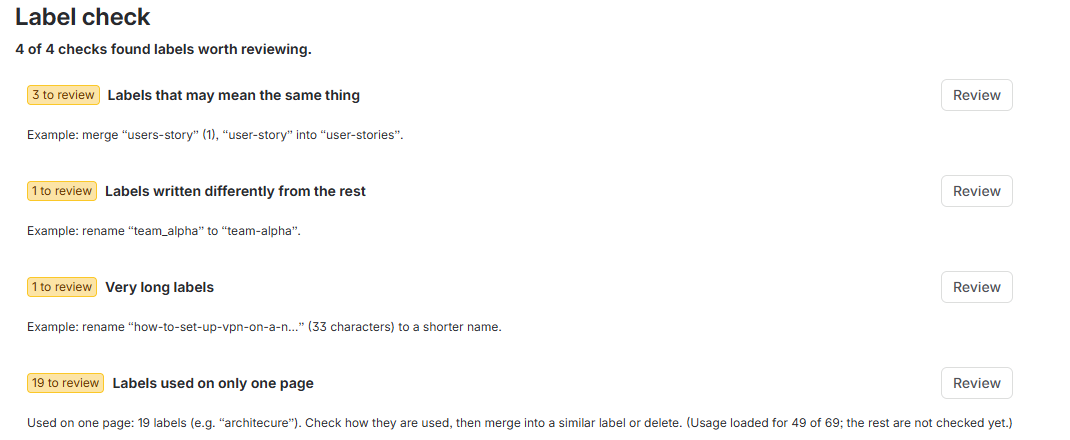

You’ll see: groups of labels with a usage count each. The label to keep is marked Suggested target.
-
3Preview the merge
Click Merge this group… on the group you want.
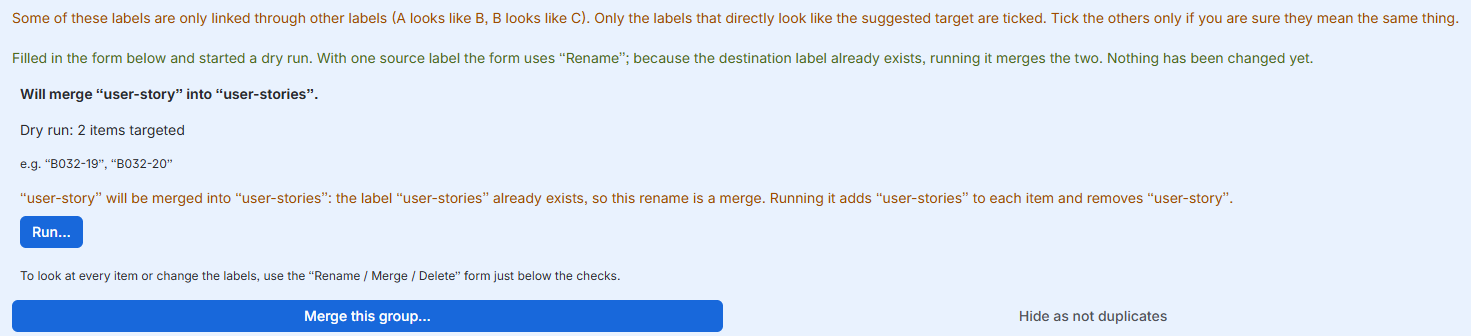
You’ll see: the app starts a dry run: “Dry run: 2 items targeted”. Only the ticked labels are merged. Tick the others only if you are sure they mean the same thing. No page has changed.
-
4Run the merge
① Click Run… under the dry run. ② Click Run in the dialog.

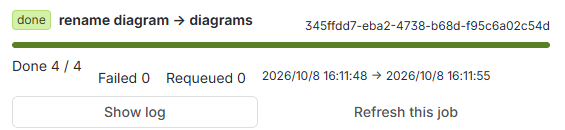
You’ll see: a dialog asks you to confirm. Then the Jobs tab opens. The job row reads done when it ends: “Done 4 / 4” and “Failed 0”. The job in the picture is an earlier rename of other labels.
To undo a merge
A finished job cannot be taken back.
The dialog warns you: “This cannot be undone.” Do the dry run first. It lists every page. After the run, open the Jobs tab and click Show log. The log lists each page the job changed. To bring a label back, add it to those pages by hand.
What it does not do
- It covers pages and blog posts. Attachment labels and space labels are not covered.
- The job runs with your permissions. A page you cannot edit counts as a failure.
- A label name cannot hold a space or any of these characters:
: ; , . ? & [ ] ( ) # ^ * @ ! ' " - The dry run table shows up to 500 items. The count above it covers all of them.
- Usage counts load for the first 200 labels. Click Load usage for the remaining 20 for the rest. The number depends on your site.
- Without a trial or a subscription the app is read-only.
More answers
I can’t find the app.
Click Apps in Confluence. If Label Sweep is not there, ask a Confluence administrator whether it is installed on this site.
Label check shows nothing.
✓ Nothing found means no label matched. The panel also needs at least two labels on the site. You can still change labels by hand with the form Rename / Merge / Delete.
The Run button is grey.
Run turns on after a dry run that found at least one item. If you change the form, do the dry run again. A site without a trial or a subscription cannot run changes.
I clicked Run and it was refused.
Only a Confluence administrator can run a change. The app shows Cannot create job. Ask an administrator to press Run.
How do I rename one label by hand?
Use the form Rename / Merge / Delete. Choose Rename (old → new) in Operation. Fill in Source label and Destination label. Click Dry run and then Run. If the destination label already exists, the rename becomes a merge.
What does Delete do?
Choose Delete in Operation. The app removes the label from each item and adds nothing. Use Labels used on only one page in Label check to find labels to delete. Nothing is ticked at first.
Which labels does “Labels used on only one page” skip?
It skips labels with a number in the name, such as sprint-12 or v2. They are used on few pages by nature.
What does “Hide as not duplicates” do?
It hides the group for everyone who uses the app. Only an administrator can hide a group. Click Show again to bring it back.
Who can see the app and who can run it?
Anyone can open it, list labels and do a dry run. Only a Confluence administrator can run, resume or hide.
Does my content leave my site?
No. Label Sweep runs on Atlassian (a Forge app) and does not send your content outside your site. See the Marketplace listing.
Need help?
Email support@hullspark.com in English or Japanese. We reply Monday to Friday and aim to answer within 2 business days. More on the Support page.
Confluence and Atlassian are trademarks of Atlassian. Label Sweep is made by Hullspark and is not made or endorsed by Atlassian.
Label Sweep で最初のラベル統合
同じ意味のラベルが 2 つあると、ページが 2 つに分かれます。ラベルで探すと一部を見落とします。Label Sweep は、そのラベルを見つけて 1 つにまとめます。4 ステップで約 10 分です。実行を押すまで何も変わりません。
アプリを開いてドライランまでは誰でもできます。変更の実行は Confluence の管理者だけです。
画像は実際の画面で、英語の画面です。名前と数字は例です。画像を押すと大きくなります。
インストール
Marketplace の掲載から Label Sweep をインストールします。Confluence のサイトを選びます。
こう見えます: アプリのメニューに Label Sweep が出ます。変更の実行には、無料試用か購読が必要です。ないときは読み取り専用になります。
-
1アプリを開く
アプリを押して、Label Sweep を押します。
こう見えます: ラベルとジョブの 2 つのタブ。ラベルの上にラベルのチェックがあります。
-
2統合するラベルを見つける
ラベルのチェックの中の同じ意味かもしれないラベルで、内容を見るを押します。
こう見えます: 使用数つきのラベルの組。残すラベルに統合先のおすすめの印が付きます。
-
3統合の結果を確かめる
統合したい組で この組を統合する… を押します。
こう見えます: アプリがドライランを始めます。「ドライラン: 2 件が対象」と出ます。統合されるのはチェックを付けたラベルだけです。ほかのラベルは、同じ意味だと確かな場合だけチェックを付けます。ページはまだ変わっていません。
-
4統合を実行する
① ドライランの下の実行…を押します。② 確認の画面で実行するを押します。
こう見えます: 確認の画面のあとジョブのタブが開きます。終わると行に done と出ます。「完了 4 / 4」と「失敗 0」です。画像のジョブは、ほかのラベルの前のリネームです。
統合を戻すには
終わったジョブは取り消せません。確認の画面に「取り消しはできません。」と出ます。
先にドライランをして、対象のページを見ておきます。実行のあとはジョブのタブでログを表示を押します。ログに、ジョブが変えたページが並びます。ラベルを戻すときは、そのページに手で付け直します。
できないこと
- 対象はページとブログ記事です。添付ファイルとスペースのラベルは対象外です。
- ジョブはあなたの権限で動きます。編集できないページは失敗になります。
- ラベル名に空白と次の文字は使えません:
: ; , . ? & [ ] ( ) # ^ * @ ! ' " - ドライランの表は最大 500 件です。表の上の件数は全部を数えています。
- 使用数を読み込むのは先頭 200 件のラベルです。残りは残り 20 件の使用数を読み込むで読み込みます。数字はサイトで変わります。
- 無料試用も購読もないと読み取り専用になります。
そのほかの質問
アプリが見当たりません。
Confluence でアプリを押します。Label Sweep がなければ、このサイトに入っているか Confluence の管理者に聞いてください。
ラベルのチェックに何も出ません。
✓ 見つかりませんでしたは、当てはまるラベルがないという意味です。サイトのラベルが 2 つ未満のときも出ません。ラベルはリネーム / マージ / 削除のフォームで手でも変えられます。
実行のボタンが押せません。
ドライランで 1 件以上見つかると押せるようになります。フォームを変えたら、もう一度ドライランをします。無料試用も購読もないサイトでは変更を実行できません。
実行を押したら断られました。
変更を実行できるのは Confluence の管理者だけです。アプリにはジョブを作成できませんと出ます。管理者に実行を頼んでください。
ラベルを 1 つだけ手でリネームするには?
リネーム / マージ / 削除のフォームを使います。操作でリネーム(old → new)を選びます。元ラベルと新ラベルを入れて、ドライランと実行を押します。新ラベルが既にあるときは、リネームが統合になります。
削除は何をしますか?
操作で削除を選びます。各コンテンツからラベルを外すだけで、何も足しません。削除するラベルは、ラベルのチェックの1 ページにしか付いていないラベルで探せます。最初は何も選ばれていません。
「1 ページにしか付いていないラベル」が見ないものは?
名前に数字が入ったラベルです。sprint-12 や v2 のように、もともと少数のページにしか付きません。
「別物として隠す」は何をしますか?
その組を、アプリを使う全員に対して隠します。隠せるのは管理者だけです。もう一度表示を押すと戻ります。
誰がアプリを見られて、誰が実行できますか?
開く・ラベルの一覧・ドライランは誰でもできます。実行・再開・隠すのは Confluence の管理者だけです。
内容がサイトの外に出ますか?
出ません。Label Sweep は Atlassian 上(Forge アプリ)で動き、内容をサイトの外へ送りません。Marketplace の掲載もご覧ください。
困ったら
support@hullspark.com へどうぞ。日本語でも英語でも大丈夫です。平日に対応し、2 営業日以内の返信を目標にしています。ほかの答えは サポートのページ にあります。
Confluence と Atlassian は Atlassian の商標です。Label Sweep は Hullspark の製品で、Atlassian が作ったものでも推奨するものでもありません。