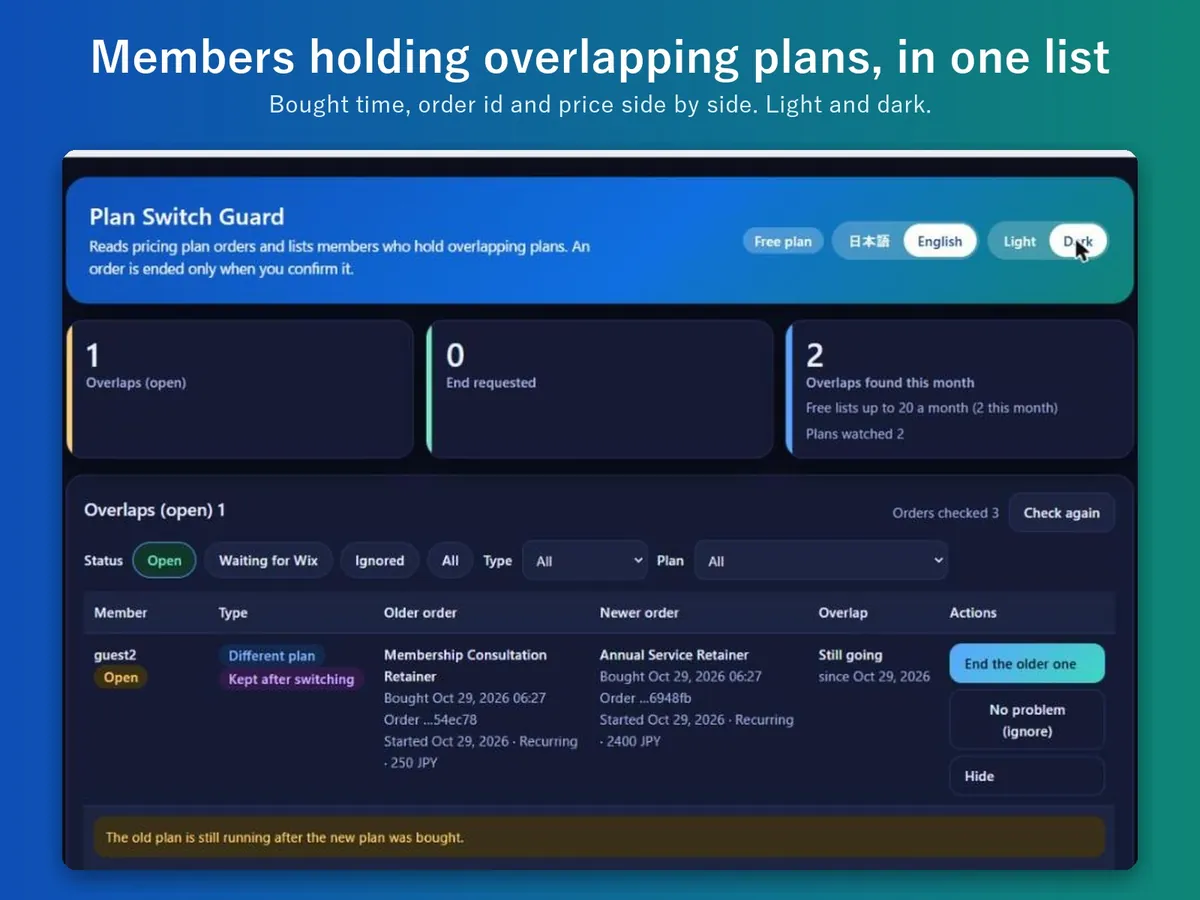
When a member switches to a new pricing plan, or buys another one, the old plan can keep billing. Plan Switch Guard reads your pricing plan orders and lists the members whose plans overlap. It shows the two orders side by side, and ends one only when you press its button and confirm.
A free plan is available: up to 20 overlaps listed and 3 orders ended per month. Pro removes both limits and adds a dashboard notice for new overlaps. Plans are listed on the Wix App Market listing.
The overlap list: two orders per member (sample screen).
In four lines
The problemA member who moved to a new plan can still hold the old one, and keep paying for both until someone notices.
Where it livesA page in your Wix dashboard. It needs Wix Pricing Plans. Nothing is placed on your public site.
What it doesIt reads the orders of your pricing plans and lists the members whose plans overlap (up to 20 a month on the free plan). Each pair shows both orders with purchase date, start date and amount. A second purchase of the same plan is always listed. Different plans are listed only when you group plans that should not be held together, such as Basic, Standard and Premium.
The resultYou see the overlaps and decide. An order ends only when you press its button and confirm. A recurring order ends at its next payment date by default.
Demo video, 49 seconds. Nothing loads from YouTube until you press play.
Who it is for
Owners of a Wix site that sells pricing plans, such as memberships.
Sites where members move between plan levels.
Not for you if you want the app to stop the purchase itself: it finds overlaps after the purchase.
How it works in 3 steps
Open the page. Open the app from the dashboard. The list shows each member with two overlapping orders.
Group plans if you need to. Group the plans that should not be held together. Without a group, only a second purchase of the same plan is listed.
End an order, or leave it. Press the button on the order, then confirm. You can also mark a pair as fine.
What it does
Overlaps in one list
Members who hold two orders at once, with purchase date, start date and amount for each.
Plan groups
Plans you group are checked against each other, so a membership and a punch card held together do not appear unless you grouped them.
A confirm step before ending
Ending an order needs a press and a confirmation. Recurring orders end at the next payment date by default.
Pro: a notice for new overlaps
A dashboard notification with the number of new overlaps and the plan names. It holds no member names or email addresses.
What it can and cannot do
It needs Wix Pricing Plans.
It does not create, pause or refund orders, and it does not contact members.
It finds overlaps after the purchase. It does not stop the purchase.
By default, a shared time of up to 24 hours is not reported, because a switch takes a moment.
Free: up to 20 overlaps listed and 3 orders ended per month.
Screens in Japanese and English, light and dark.
Questions
Does it stop members from buying a second plan?
No. It finds overlaps after the purchase. A purchase limit on the plan in Wix can be used alongside it.
Does it cancel orders by itself?
No. An order ends only when you press its button and confirm.
When does an ended order stop?
A recurring order ends at its next payment date by default. A one-time order ends immediately.
Does it contact my members?
No. It also sends no email.
What does the free plan include?
Up to 20 overlaps listed and 3 orders ended per month. Pro has no limit and adds the notice for new overlaps.
 Hullspark