Where an item sits, how it is packed and who supplies it usually lives in a notebook or a spreadsheet that drifts away from the store. This app keeps it next to the product: a shelf code, a packing note, a supplier and a free note. Only the store owner and collaborators see the notes.
A free plan is available: notes for up to 20 products and the first 10 rows of the CSV. Pro removes both limits. Plans are listed on the Wix App Market listing.
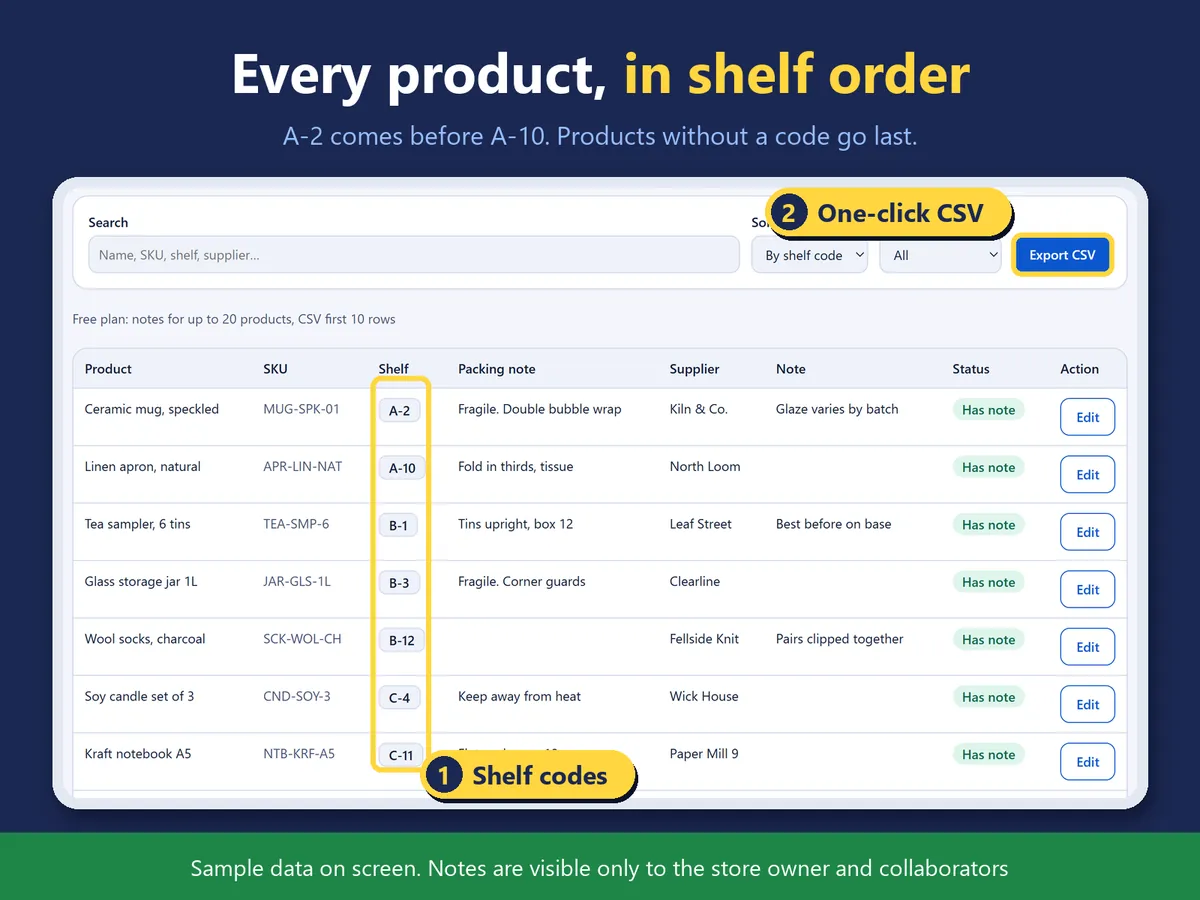
The main page: every product sorted by shelf code (sample screen).
In four lines
The problemShelf positions, packing instructions and suppliers sit in a notebook or a separate sheet, away from the products they belong to.
Where it livesA page in your Wix dashboard and an item in the ... menu of each product in the products list. Nothing is shown on your public site.
What it doesFor each product you write a shelf code, a packing note, a supplier and a free note. The main page lists every product with its SKU, sorted by shelf code, so A-2 comes before A-10 and products without a code come last. You can search names, SKUs, shelf codes, suppliers and notes, and show only products with or without a note.
The resultOne list you can export as a CSV for a picking walk or a stocktake. The CSV opens in a spreadsheet app without garbled characters.
Demo video, 49 seconds. Nothing loads from YouTube until you press play.
Who it is for
Wix Stores owners who pick and pack their own orders.
Shops that count stock by walking the shelves.
Not for you if you only want a note visible to customers: these notes are never shown on your site.
How it works in 3 steps
Open the page. Open the app from the dashboard. Your products are listed with SKU, sorted by shelf code.
Write a note. Click a product to write its shelf code, packing note, supplier and free note. In the products list, the ... menu of a product opens the same note in a small window.
Search or export. Search across names, SKUs, shelf codes, suppliers and notes, or filter by with or without a note. Export the list as a CSV.
What it does
A list sorted by shelf code
A-2 comes before A-10, and products without a code come last.
Four fields per product
Shelf code, packing note, supplier and a free note.
Open a note from the products list
The ... menu on each product opens the note in a small window. A short banner above the list shows how many products have notes.
CSV for picking or stocktake
Shelf codes, packing notes and suppliers in one CSV that spreadsheet apps open correctly.
What it can and cannot do
Only the store owner and collaborators can see the notes. Site visitors never do.
Free: notes for up to 20 products and 10 CSV rows. Notes you have already saved stay readable and editable on either plan.
It reads products and SKUs. It does not read orders, customers or members.
Screens in Japanese and English, light and dark.
Questions
Can customers see the notes?
No. Only the store owner and collaborators.
What happens to my notes if I stay on the free plan?
Notes for up to 20 products can be added. Notes already saved stay readable and editable.
How are the shelf codes sorted?
By number inside the code, so A-2 comes before A-10. Products without a code come last.
Does it read orders or customers?
No. It reads your products and SKUs.
Does the CSV open in a spreadsheet app?
Yes. It is written so that spreadsheet apps show the characters correctly.
 Hullspark