A calendar for your Wix site that marks your weekly closing days and Japan’s national holidays on its own. Customers see when you are closed without you remaking a notice image for every holiday. The Pro plan adds one-off closing days and a “next shipment” line.
Made for shops in Japan: the holidays are Japan’s. A free plan is available; prices are on the Wix App Market listing.
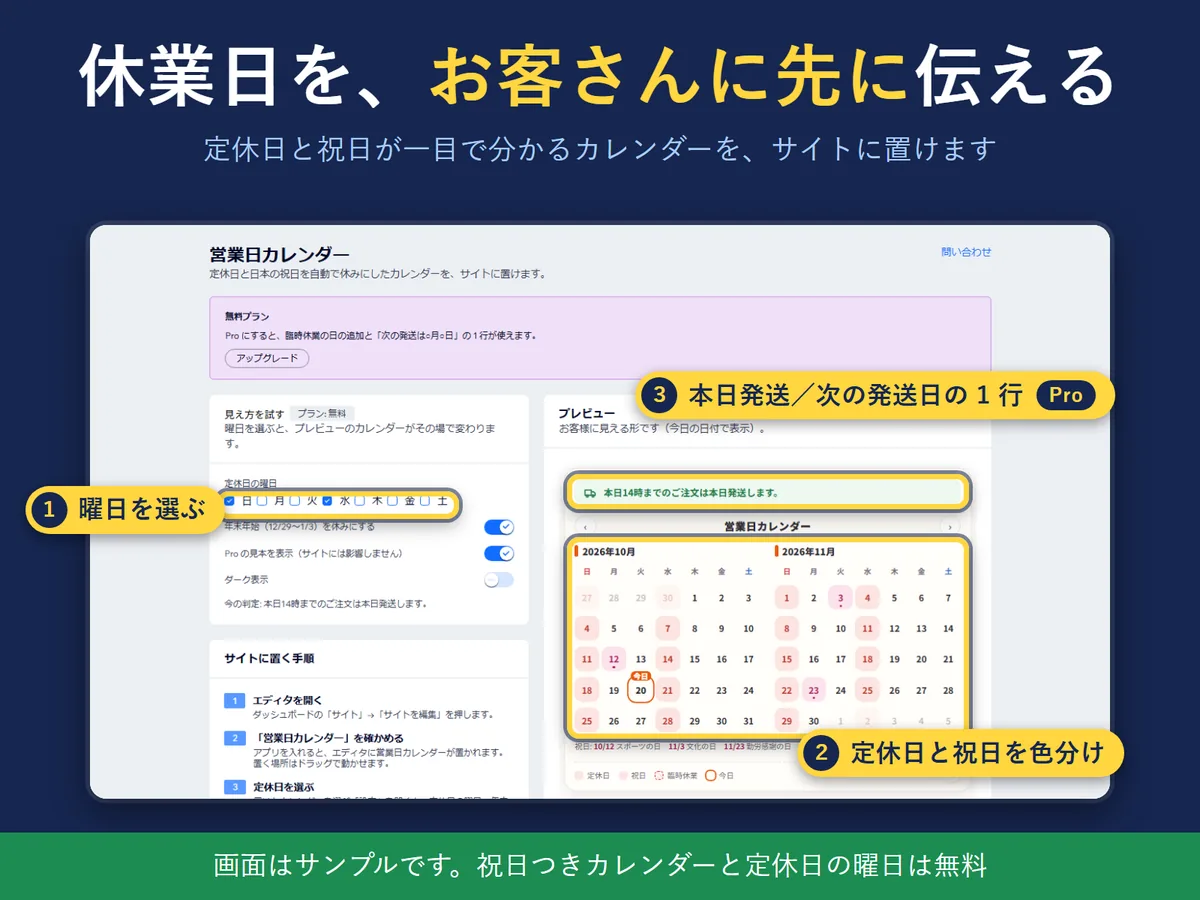
The “Business Day Calendar” dashboard page, with the calendar preview (Japanese screen, sample data).
In four lines
The problemWix has no holiday mode, so there is no set place on your site to tell customers when you are closed. Every holiday or long weekend means making a new notice image.
Where it livesA Business Day Calendar widget that you place on a page in the Wix editor. Installing the app puts it in the editor. Select it and open Settings to choose your closing weekdays, whether holidays are open, the New Year break and dark mode. The dashboard page of the app lets you try the look; nothing you do there is saved.
What it doesThe calendar marks your closing weekdays and Japan’s national holidays (substitute holidays and citizens’ holidays included) in colour, and marks today. It shows two months on a wide frame and one month at a time on a narrow one, such as a phone, with arrows to move between months. A banner shows the next closure, for example “Next closure: Oct 24 (Sat) - Oct 25 (Sun) (2 days off)”. With Pro you can add one-off closing days and one-off opening days, and show a line such as “Orders placed before 14:00 today ship today” or the next shipping date, with a countdown to the cut-off.
The resultYour closing days and a shipping guide are always visible on your site. No more remaking an image at every long weekend.
Who it is for
Wix site owners in Japan who close on fixed weekdays and on Japanese national holidays and want visitors to see it.
Online shops that want to show the next shipping day without writing it by hand.
Not for you if you need the holidays of a country other than Japan: only Japan’s national holidays are built in.
How it works in 3 steps
Add it to a page. Install the app and open the editor (Site, then Edit Site). The calendar widget is placed for you; drag it where you want it and set its width and height.
Choose your closing days. Select the calendar and open Settings. Pick the closing weekdays, whether to stay open on national holidays, the New Year break (Dec 29 - Jan 3), dark mode and the display language. Settings are saved for each calendar you place.
Publish. Publish the site. Visitors see the calendar with closing days and holidays marked, and they can switch between light and dark with the button at the bottom right of the calendar.
What it does
Closing days and Japanese holidays, marked in colour
The calendar marks your closing weekdays and Japan’s national holidays (including substitute holidays and citizens’ holidays) and marks today. A banner shows the next closure or long weekend with holiday names. It shows two months on a wide frame, and one month at a time with arrows when the calendar is narrower than 520 px. Holiday names are shown in English when the language is English.
The “Business Day Calendar” dashboard page, with the calendar preview (Japanese screen, sample data).
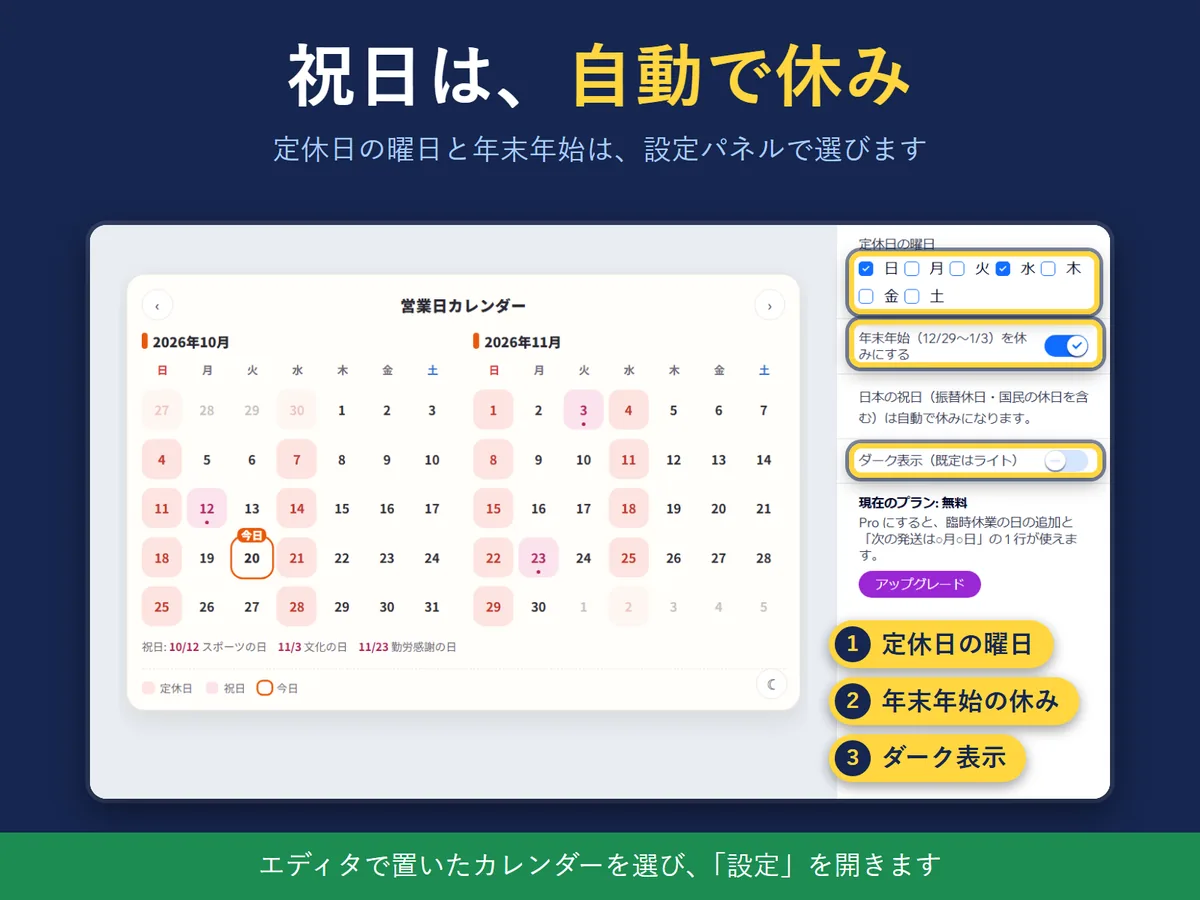
Closing weekdays and the New Year break, in the settings panel
Select the calendar in the editor and open Settings to choose the closing weekdays, “Open on national holidays”, the New Year break (Dec 29 - Jan 3, on by default), dark mode and the display language (Japanese, English or Auto, which follows the site). You can also keep, replace or hide the sentence shown under the calendar for months outside the built-in holiday data. A holiday that falls on a closing weekday counts as one closing day and is not counted twice in shipping dates.
The settings panel (Japanese screen, sample data).
Pro: one-off closing and opening days, and a shipping line
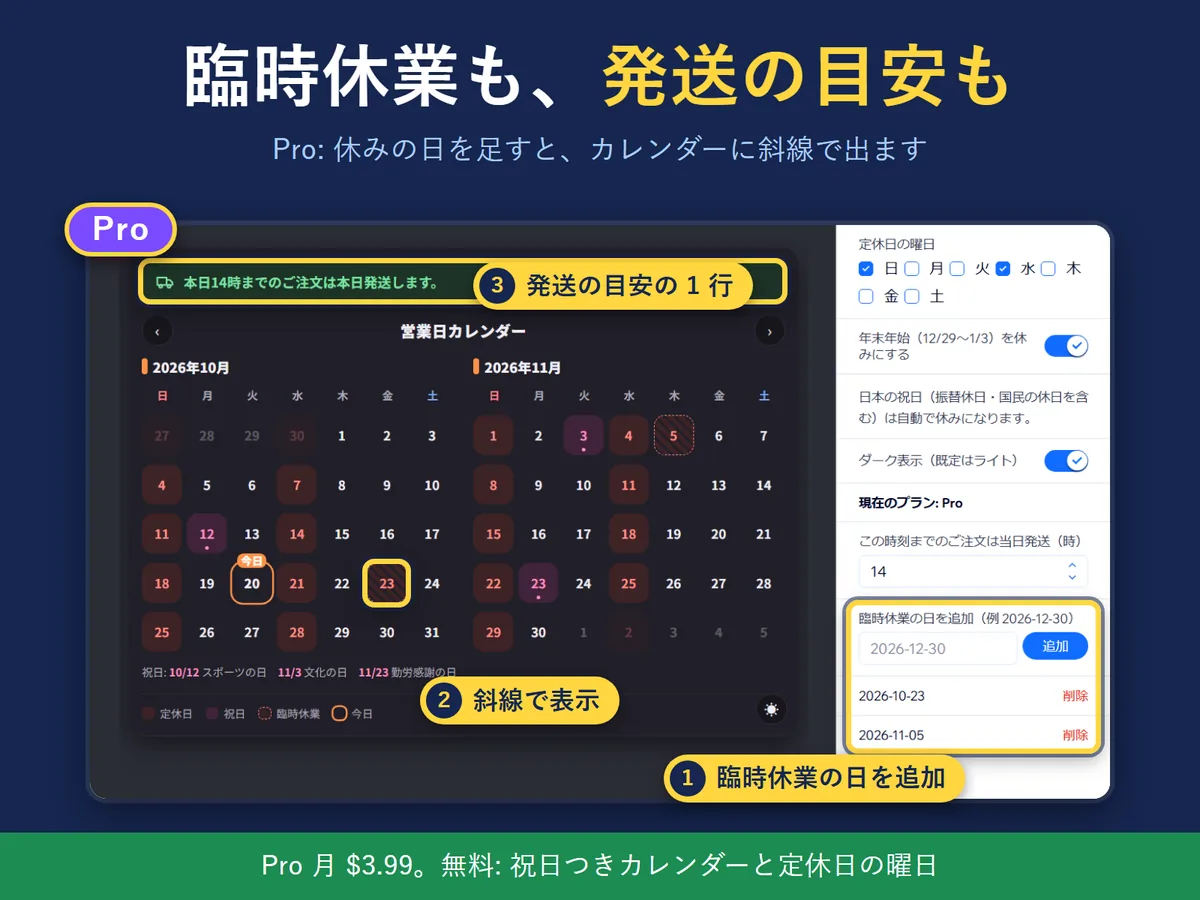
With Pro you can add one-off closing days, and one-off opening days for a day you would normally be closed. A one-off closure is drawn with a diagonal stripe. You can also show a line such as “Orders placed before 14:00 today ship today” or the next shipping date, with a countdown to the cut-off. The cut-off hour (14:00 by default) is a setting. The line follows Japan time and refreshes every minute while the page is open.
The Pro screen (Japanese screen, sample data).
What it can and cannot do
Language: the calendar, the settings panel and the dashboard page work in Japanese and in English. In the settings, Display language is Japanese, English or Auto (follows your site’s language). Some names inside Wix itself are in Japanese only: the widget name and preset name in the editor, and the dashboard menu item, are all “営業日カレンダー”. The screenshots on this page show the Japanese screen.
Free: the calendar with holidays, closing weekdays, “Open on national holidays”, the New Year break, dark mode and the next-closure banner. Pro: one-off closing and opening days, and the shipping line with its cut-off countdown. The price is on the Wix App Market listing.
Holidays: Japan’s national holidays for 2026 and 2027 are built in, copied from the Cabinet Office list. For months outside that range the calendar shows “No holiday data” and no shipping line, so a wrong date is never shown. 2028 is to be added by an update.
The New Year break is fixed at Dec 29 - Jan 3. A closure outside that range is added one day at a time as a one-off closing day (Pro).
The shipping line is decided in Japan time, so the app is made for shops in Japan.
If the app cannot read your plan from Wix, it shows the free plan.
The app collects no customer data. The only thing it asks Wix is whether your site is on the free or the Pro plan.
Not included: the holidays of other countries, and colour schemes other than light and dark.
Questions
Where do I change the settings?
In the site editor, select the Business Day Calendar and open Settings: closing weekdays, whether holidays are open, the New Year break (Dec 29 - Jan 3), dark mode and display language. Settings are saved per calendar. "Try the look" on the dashboard page is only for trying it out.
How far do the holidays go?
Japanese national holidays for 2026 and 2027 (including substitute holidays) are built in. Months outside that range show "No holiday data" and the shipping line is hidden so a wrong date is never shown. 2028 is added by an update after the Cabinet Office publishes it.
What if a holiday falls on a closing weekday?
It is shown as a holiday (when "Open on national holidays" is off). It counts as one closing day and is not counted twice in shipping dates. With "Open on national holidays" on, that day is still closed because of the weekly closing day, and is shown as a closing day.
Can I stay open on holidays?
Yes. Turn on "Open on national holidays" in Settings (free). Holidays then count as business days; a holiday on a closing weekday stays closed. To open on one specific date only, add it under "One-off opening days" (Pro).
How is the "next shipment" decided?
In Japan time. If today is a business day and before your cut-off (14:00 by default), orders ship today; otherwise on the next business day. It refreshes every minute while the page is open. Changing the cut-off is a Pro setting.
What is the difference between Free and Pro?
Free: two-month calendar with holidays, closing weekdays, open-on-holidays, New Year break, dark mode, next-closure banner. Pro: one-off closing and opening days, and the shipping line with a cut-off countdown. The plan follows your app subscription in Wix and is checked each time the page opens; if it cannot be read, Free is shown. The price is on the Wix App Market listing.
Is the app available in English?
Yes, in part. The calendar, the settings panel and the dashboard page can be shown in English (Display language: English, or Auto to follow your site). The widget name in the editor and the dashboard menu item are in Japanese only ("営業日カレンダー"). The holidays and the shipping judgment are Japan's, so the app is made for shops in Japan.
Does it work on a phone?
Yes. When the calendar is narrower than 520 px it shows one month at a time, and you move between months with the arrows. On a wider frame it shows two months.
Can I change the colours or size?
Change width and height in the editor. There are two colour modes, light and dark (customers can switch with the button at the bottom right of the calendar).
Does the app collect my customers' data?
No. The only thing the app asks Wix is whether your site is on the free or the Pro plan.
 Hullspark