A Wix app that turns the orders waiting to ship into one combined pick list and a packing list for each order, as A4 PDF or CSV. It also prints what your customers wrote: the buyer note, checkout custom fields, delivery instructions and custom text typed on a product, such as engraving or a gift message.
Free for up to 20 orders per list. It only reads your orders and never changes them.
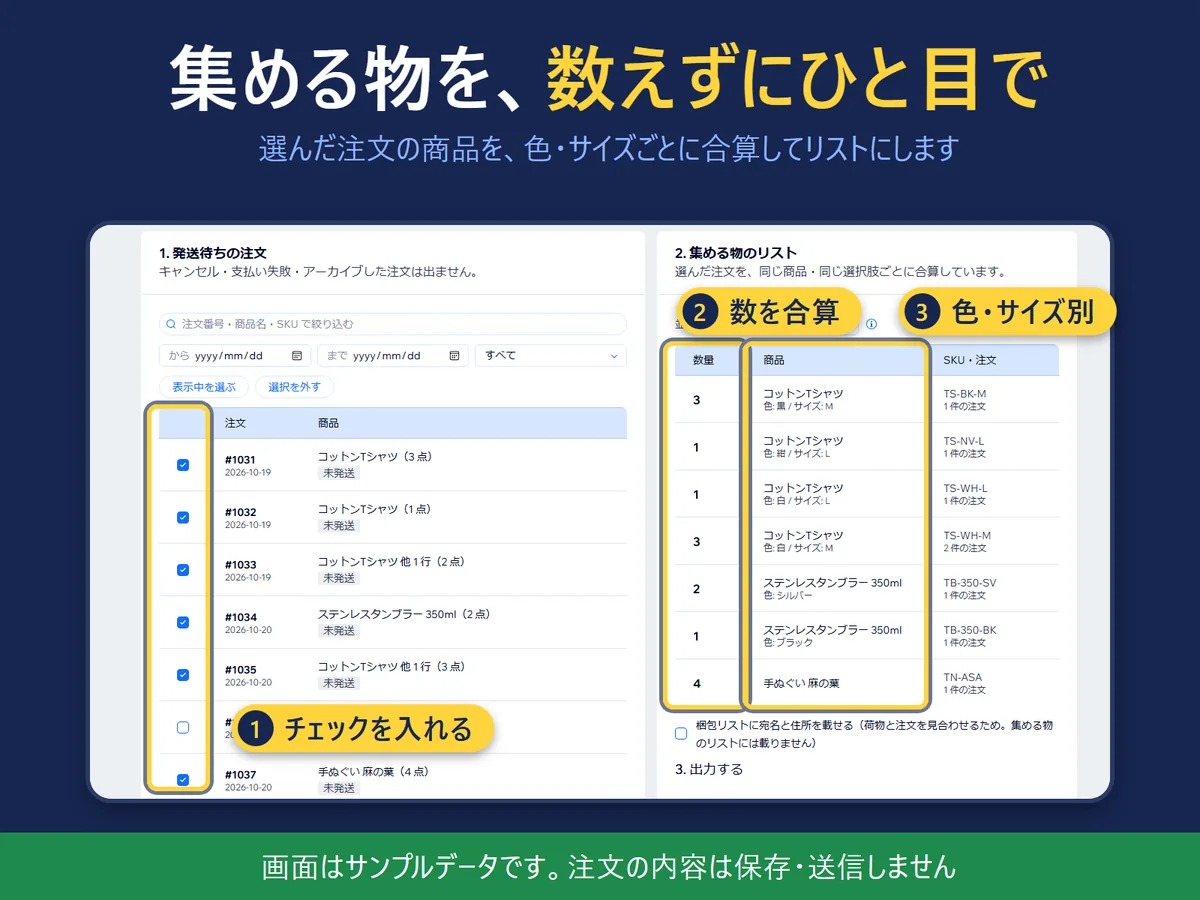
The picking screen (sample orders).
In four lines
The problemPacking a day of orders one by one means walking to the same shelf again and again, and a gift message or engraving request can get lost in the order screen.
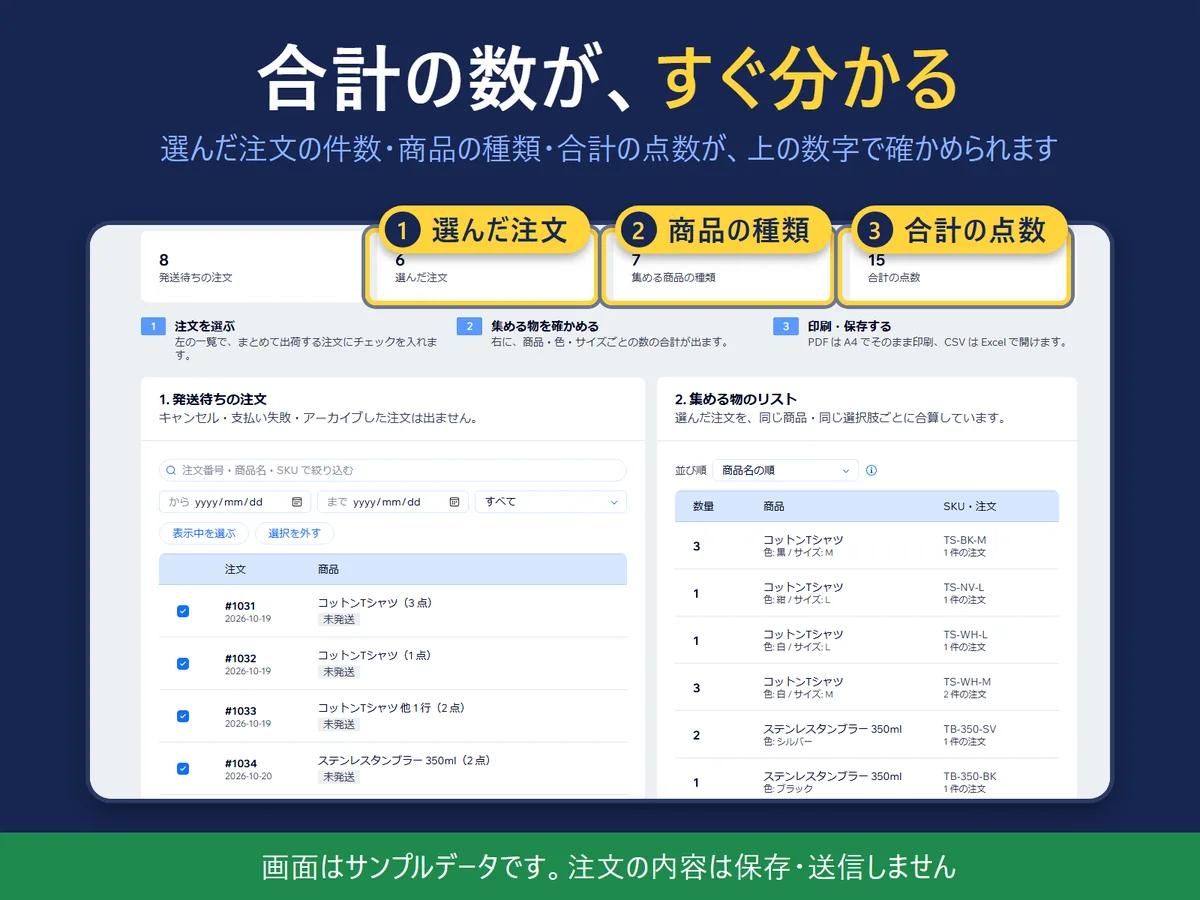
Where it livesA page in your Wix dashboard with three steps: 1. Orders to ship, 2. Pick list, 3. Output. Counters at the top show the orders you chose, the kinds of items and the total pieces.
What you doTick the orders you will ship together. The same product with the same options is added into one row, with the quantity and the order numbers. Then make the pick list and the per-order packing lists as PDF or CSV.
The resultOne trip along the shelves, and a packing list per parcel that carries the customer's own words next to the items they belong to.
Demo video, 53 seconds. Nothing loads from YouTube until you press play.
Who it is for
Small online shops on Wix that pack their own parcels, from a few orders a week to a few hundred, and want a printed list instead of opening each order.
Shops that sell gifts, engraved or made-to-order items, where the buyer's note or a text field decides what goes in the box.
Not for you if you want an invoice with prices, or if you need the app to mark orders as shipped. It does neither.
How it works in 3 steps
Choose the orders. Orders not yet shipped and partly shipped orders are listed, newest first. Filter by date, shipping status, order number, product name or SKU, and tick the ones to pack.
Check the pick list. The same product with the same options becomes one row with the quantity and the orders it is in. Different colours or sizes stay on separate rows.
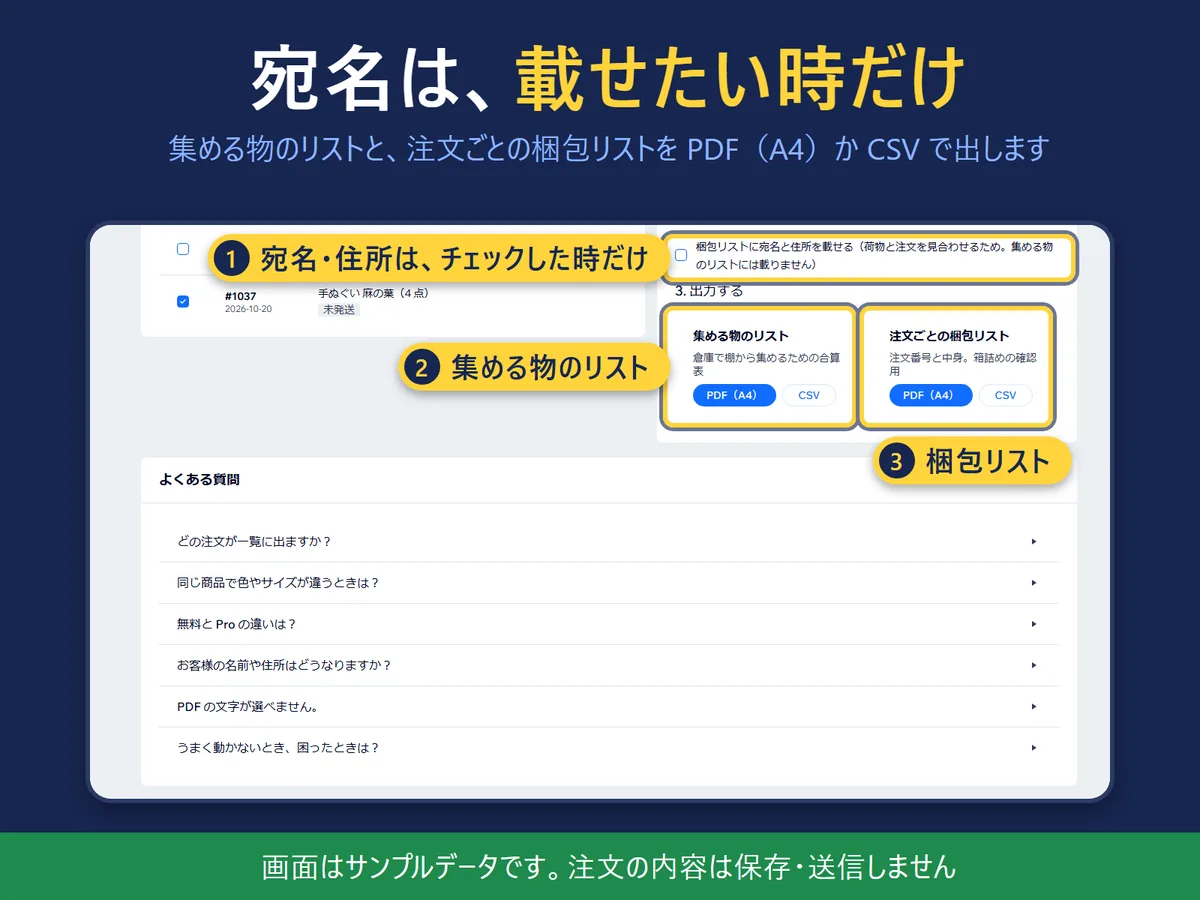
Output. Make the pick list and the packing lists as A4 PDF or as CSV. Tick the checkbox for names and addresses only if you want them on the packing list.
What it does
The customer's own words, on the paper in your hand
The app prints four kinds of customer input, each with a label: the buyer note left at checkout, the answers to your checkout custom fields, the delivery instructions, and custom text typed on a product (engraving, a name to print, a gift message). On the packing list they sit under the order and under the item they belong to. On the pick list they are gathered at the end, by order number. A checkbox, on by default, turns them off. No extra permission is needed. Text that is too long for the paper is cut short and marked, and the full text is in the CSV.
What to collect, without counting
Refunded quantities are subtracted, and downloads, services, gift cards and items shipped by another app are left out. For a partly shipped order only the part not yet shipped is collected. Where Wix has no shipping record for a partly shipped order, the line is marked as a count to check instead of guessing.
The totals (sample orders). Order data is not stored or sent anywhere.
Addresses only when you want them
The pick list never shows names and addresses. On the packing list they are printed only when you tick the checkbox, so a parcel can be matched to its order.
The output step (sample orders).
Try it without orders
“Try with sample orders” makes a PDF or CSV from made-up orders. Nothing is written to your store, and the file names start with sample-.
English and Japanese, light and dark
The screen, the PDF and the CSV come in English and Japanese. The starting language follows your saved choice, then the Wix dashboard language, then the browser language, and a button at the top switches it.
What it can and cannot do
It only reads orders. It does not change them or mark anything as shipped. Order data is used in your browser, is not stored, and is not sent anywhere. Only the display theme and language are remembered in the browser.
The packing list shows the order number, the contents and a check box. It has no prices, so it does not replace an invoice.
The free plan lets you choose up to 20 orders per list; Pro has no limit. PDF and CSV are both free. The price is on the Wix App Market listing.
Up to 1,000 orders are loaded. Cancelled, payment-failed and archived orders are not listed.
The PDF is made of one picture per page, so its text cannot be copied. For copying or sorting use the CSV, which opens in Excel and keeps leading zeros in order numbers and SKUs. A PDF with Japanese text needs a Japanese font on the device; without one the app shows a note and you can use the CSV.
PDF and CSV files that carry names, addresses or customer input can hold personal data. Store and dispose of them with care.
A very long list (about 100 pages or more) makes a heavy PDF. Use the CSV for those.
Questions
Which orders are listed?
Orders not yet shipped and partly shipped orders, newest first. Cancelled, payment-failed and archived orders are left out. Up to 1,000 orders are loaded.
Can it print the note a customer left at checkout?
Yes. It prints the buyer note, the answers to your checkout custom fields, the delivery instructions, and any custom text typed on a product, such as engraving or a gift message. Each is labelled. On the packing list they appear under each order and each item; on the pick list they are collected at the end. A checkbox turns them off, and it is on by default.
What if the same product comes in different colours or sizes?
Different colours or sizes stay on separate rows. Only the same product with the same options is added up.
What is the difference between Free and Pro?
Free lets you choose up to 20 orders per list. Pro has no limit. You can make both PDF and CSV on Free. The price is on the Wix App Market listing.
What happens to my customers' names and addresses?
The pick list never shows them. On the packing list they are printed only when you tick the checkbox for them. The PDF and CSV are made in your browser. Order data is not stored or sent anywhere.
Can I try it without any orders?
Yes. “Try with sample orders” makes a PDF or CSV from made-up orders so you can see the output. Nothing is written to your store, and the file names start with sample-.
Can the packing list replace an invoice?
No. It shows the order number, the contents and a check box, but no prices. Use it as a checklist for packing.
Does it change my orders?
No. It only reads orders. It does not mark anything as shipped.
Is the app available in Japanese?
Yes. The screen, the PDF and the CSV come in English and Japanese, in light and dark.
 Hullspark