 Hullspark
How to change the low stock number in Wix Stores
You turned on the low stock message and want it to start at a different number. Or you want to be told when a product gets low. Here is what the message is, where its number lives, and what it cannot do.
Hullspark · 2026-10-29
Short answer
- The “low stock” message is for shoppers, not for you. Wix describes it as appearing on the product page once inventory dips below 10, for products with tracked quantity [2].
- In Wix Studio you can change that number. On the product page, select the Low Stock notification element, click its gear icon and type your number. That is what the forum answers say [1][3].
- In the classic Wix Editor, one forum answer says it stays at 10, and custom code is the way to another number [1]. The Help Center article does not describe any way to change it [2].
- Neither number alerts you. Wix sends no email when a product is out of stock. You get a dashboard and Wix app notification at zero, and nothing at a low number. Wix’s help article points to a third-party app for low stock alerts [4].
The figure shows who each number is for. The shopper message and your own alert are two separate things.
Change the number shoppers see
- Open the product and turn on Track inventory quantity. Then tick Low stock message in the product’s Settings tab [2].
- In Wix Studio, open the product page in the editor and select the Low Stock notification element. Click the gear icon and enter your number [1]. A July 2026 forum answer describes the same thing as enabling “Stock status” in Settings and editing the “Only X left in stock” element, where only the number and the styling change, not the wording [3].
- In the classic Editor, a forum answer says the number is fixed at 10 and can only be switched on or off. For another number it suggests custom code that reads the quantity, and warns that a text element may flicker on load [1].
The forum answers differ by editor and were corrected during the thread, so check the editor you use before you rely on them.
Why this is not an alert
- It only shows on the product page. Nobody is told. If you do not open that page, you do not see it.
- One number for the page. The setting sits on the element, so a slow seller you reorder at 3 and a fast one you reorder at 40 follow one rule unless you add code.
- Your own notice comes at zero. Wix says it does not send an email for out of stock, and you get a notification in the dashboard and in the Wix app [4]. By then the shelf is empty.
If you want an alert at your own number
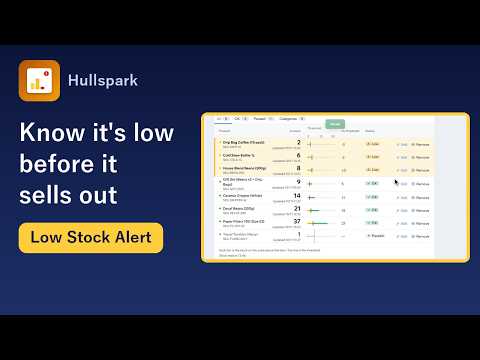
The app Low Stock Alert on the Wix App Market tells you, not the shopper. In the app you press “Start watching at 5”, or type another number, and every product is watched with it, new products too. A product or a single variant, such as a size or colour, can have its own number. A product at or under its number is marked Low, and at 0 it is marked Out of stock. When a product turns Low or Out of stock, an alert goes to the Wix app on your phone and to the dashboard bell (each kind can be switched off). No email is sent. It reads products, categories and stock only.
Questions
Can I change the wording of the “Only X left” message?
A July 2026 forum answer says only the number and the styling change, not the wording.
Does the Studio number apply to every product?
It sits on the Low Stock notification element of the product page, so one number applies to every product shown with that page. It is not set per product or variant.
Can I get an alert at my own number for one product only?
Wix has no such setting. The app above lets a product or a single variant have its own number and sends the alert to you.
Not verified
I read the Wix Help Center and the Wix Studio forum on 2026-10-29. Forum answers are from other users, not from Wix, and I did not test them on a live store. The app description follows the app's code and tests as of 2026-10-29. Wix screens and features change.
Sources
- [1] Wix Studio community forum, “Low stock warning: how do I choose from what quantity the message to customers begins to appear” (Sept 2026): https://forum.wixstudio.com/t/low-stock-warning-how-do-i-choose-from-what-quantity-of-products-the-message-to-customers-that-x-products-remain-in-stock-begins-to-appear/79628
- [2] Wix Help Center, Wix Stores: About Inventory Management: https://support.wix.com/en/article/wix-stores-about-inventory-management
- [3] Wix Studio community forum, “Adding a Low Stock Notifier on my Product Page” (answers to July 2026): https://forum.wixstudio.com/t/adding-a-low-stock-notifier-on-my-product-page/40928
- [4] Wix Help Center, Wix Stores Request: Receiving Notifications When Products Are Out-of-Stock: https://support.wix.com/en/article/wix-stores-request-receiving-notifications-when-products-are-out-of-stock
Related
- How to get low stock alerts in Wix Stores: your options
- Can Wix send me a daily list of low-stock products?
- Product page for the app
Questions? Support or support@hullspark.com. Privacy policy