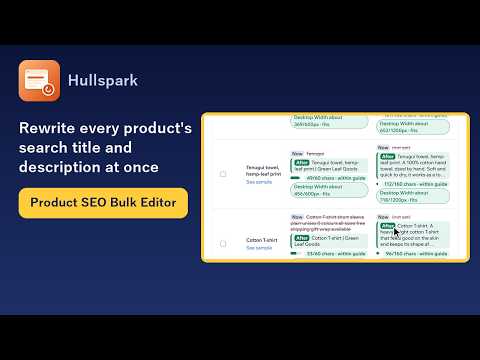
A Wix app for rewriting the search-result title and description of your products in bulk. Write a template, see the current text and the new text side by side, apply only the products you tick, and undo a run from its saved record if you change your mind.
Free for up to 20 products per run. Nothing is written until you confirm. The app does not read customers or orders.
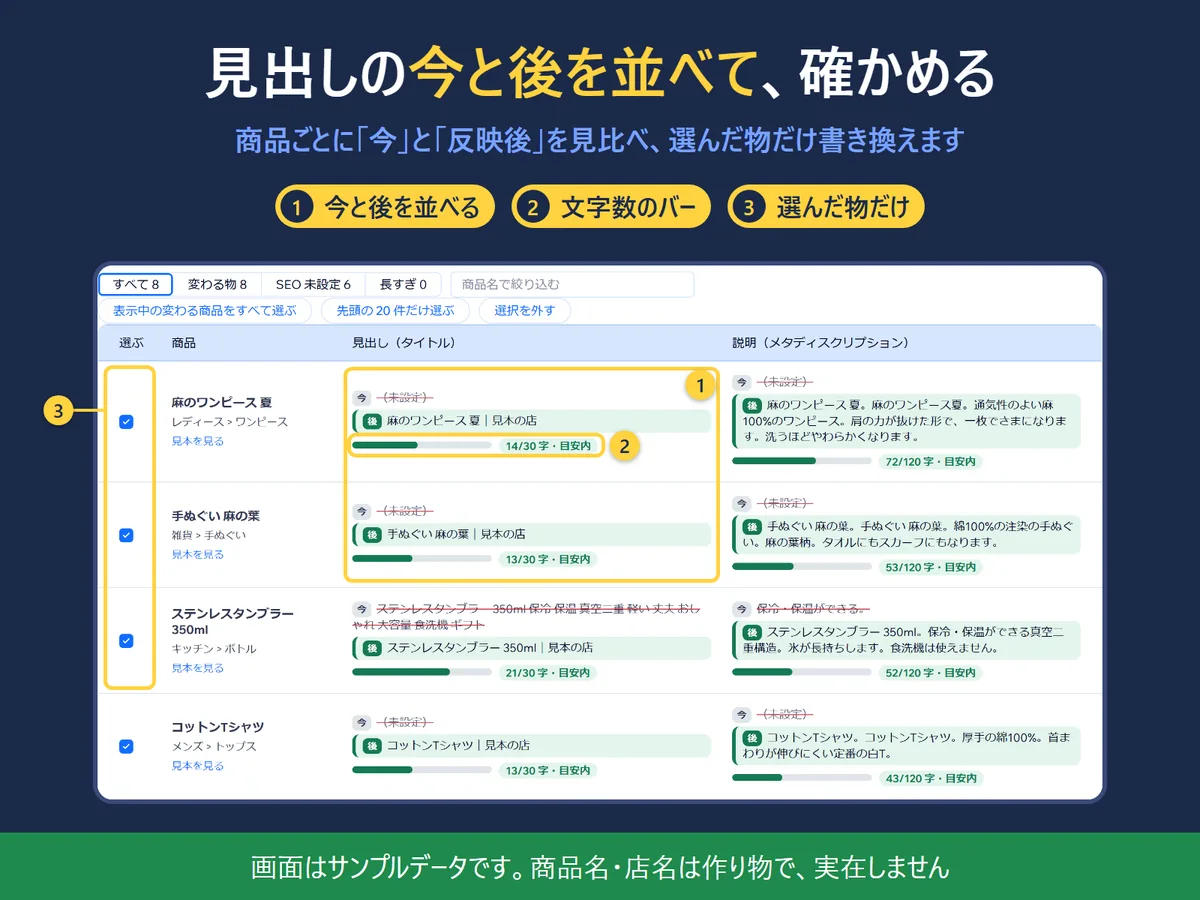
The preview screen (Japanese screen, sample data).
In four lines
The problemThe more products you have, the slower it is to rewrite their search-result titles and descriptions one by one. After a bulk change, if you decide the old text was better, you no longer have it.
Where it livesThe Product SEO Bulk page in your Wix dashboard menu. You work down four steps: 1. Template, 2. Preview, 3. Apply, 4. Undo.
What you doEnter your shop name and a template for the title and the description. You can use {product name}, {shop name}, {brand}, {category} and {description}. In the preview table each product shows the current text struck through in grey and the new text in green, with a length bar that flags text that is too long. Tick the products you want and apply. You can also download all titles and descriptions as a CSV, edit the “_new” columns in a spreadsheet and load the file back.
The resultYou check before anything is written, only the products you chose are rewritten, and you can pick a run from the record later and undo it.
Demo video, 52 seconds. Nothing loads from YouTube until you press play.
Who it is for
Wix Stores owners with dozens to hundreds of products whose search titles and descriptions are missing, inconsistent or duplicated.
Shops that want to apply one pattern, such as “product name | shop name”, to many products and still check each result.
Not for you if you want the app to write your SEO text or to promise higher rankings. It applies the text you define and does neither.
How it works in 3 steps
Write a template. Enter the shop name and the title and description templates. A placeholder with no value for a product is dropped together with the separator next to it. A field whose template is empty keeps its current value.
Check the preview. Every product shows now and after, a length bar, and a sample of how the search result may look. Filter by All, Will change, SEO not set, Too long, or Empty or duplicate, and tick the products to change.
Apply, and undo if needed. Confirm in the dialog; you can save an undo file first. Each run is recorded with the before and after values, and you pick a run from the list to undo it.
What it does
Now and after, side by side
Each product shows its current text (struck through in grey) and the new text (green), with a length bar and a mark for text that is too long. Filters: All, Will change, SEO not set, Too long, and Empty or duplicate. The length guide is about 60 characters for a title and 160 for a description in English, and 30 and 120 in Japanese. It is a general guide, not a limit set by Wix or Google. Products that share the same title or description are flagged, because search engines advise a distinct title and description for each page.
The preview screen (Japanese screen, sample data).
A search-result sample, and a check before anything is written
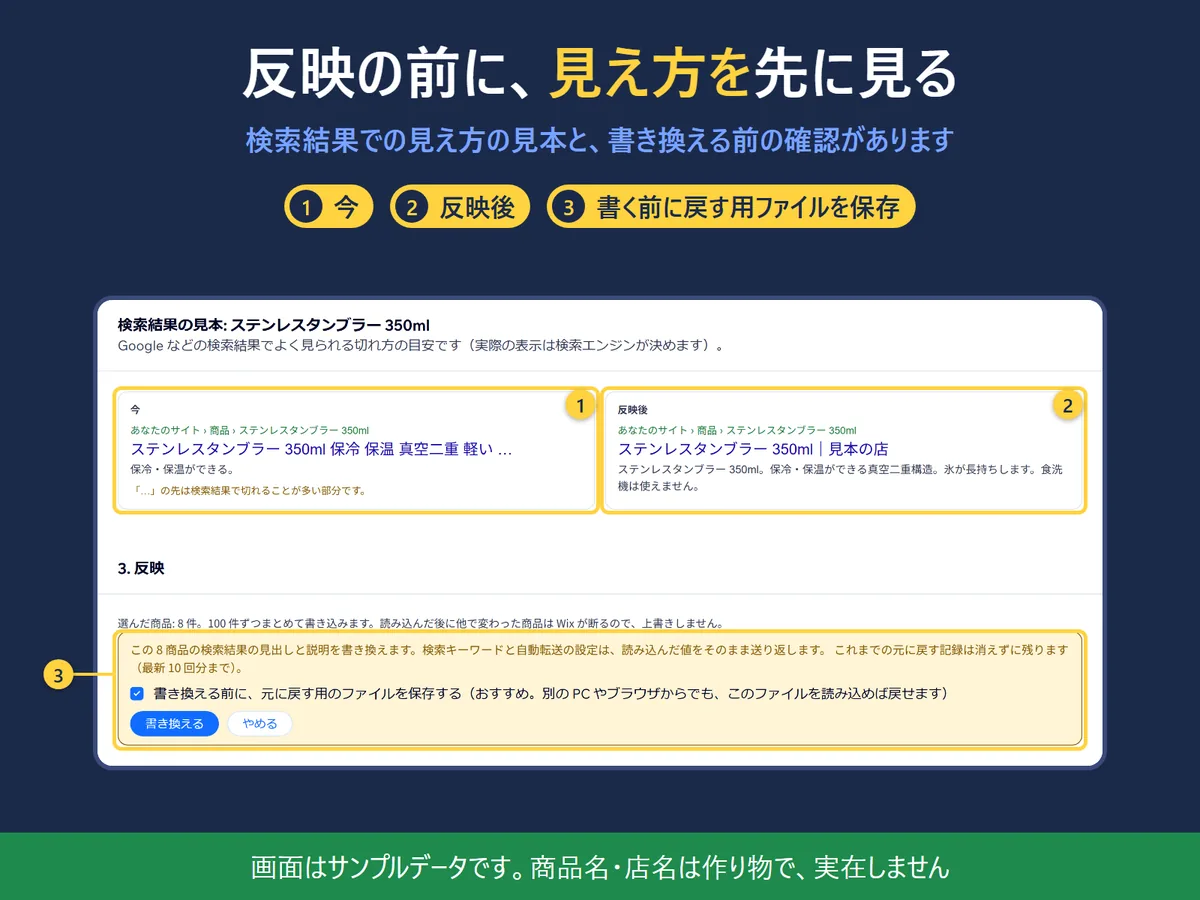
For each product you can open a sample of how the search result may look now and after, for desktop or phone. The cut is drawn by width and is an estimate; the search engine decides what is shown. The confirmation can first save an undo file.
The search-result sample and the confirmation (Japanese screen, sample data).
Undo from the record of each run
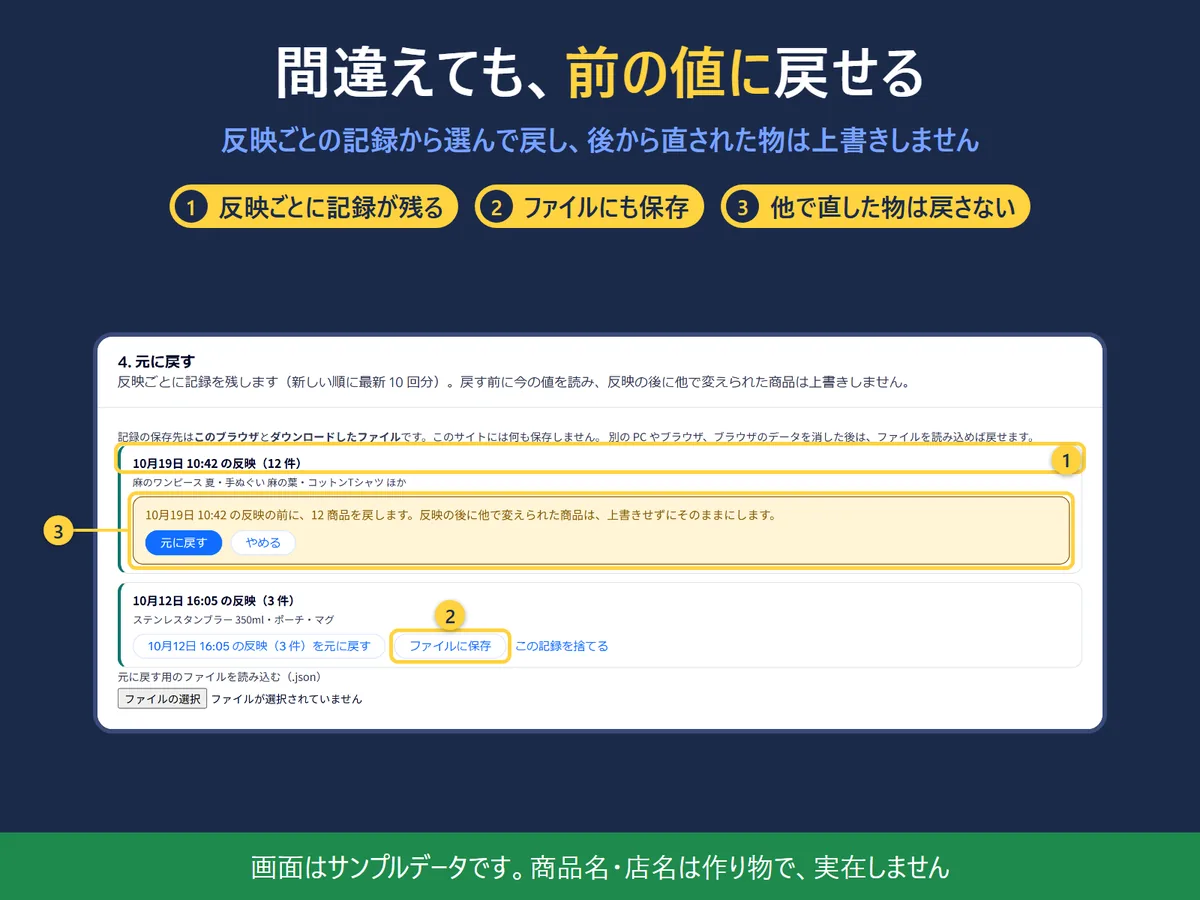
Each run keeps the before and after values of the rewritten products. Pick a run from the list to restore it. Before undoing, the app reads the current values, and a product that someone changed after the run is left as it is; the screen shows how many were not restored and which.
The undo screen (Japanese screen, sample data).
Edit in a spreadsheet (CSV)
Download every product’s title and description, edit the “_new” columns in Excel or Google Sheets, and load the file back. It goes through the same preview, selection and undo as the template. Lines that look garbled, repeat an id or no longer match the store are skipped and listed, not written.
What it can and cannot do
Free: up to 20 products per run, with no limit on the number of runs. Pro: no limit on products per run. The price is on the Wix App Market listing.
The app rewrites only the title and the description (meta description) of the products you pick. Other tags, the search keywords and the auto-redirect setting are sent back exactly as they were loaded.
On a store with the new catalog, products are written 100 at a time, and a product changed elsewhere after it was loaded is refused by Wix, so nothing is overwritten. On the old catalog (V1) each product is read just before it is written, one at a time, which is slower.
The undo record is kept in your browser (the latest 10 runs) and in the file you download. Nothing is saved on your site, and the app does not turn on the site’s code editor. To undo from another PC or browser, load the saved file in step 4.
The app reads only the name, description, brand, category and SEO settings of products and writes only their SEO. It does not read customers or orders, and sends nothing to anyone other than Wix.
The app does not promise higher rankings or that a search engine will show your text as written.
Language: the screen is in English and Japanese. It follows your saved choice, then the Wix dashboard language, then the site language, then the browser language, then English, and you can switch it on the screen. The screenshots on this page show the Japanese screen.
Questions
Where is the undo record kept?
In this browser and in the file you download. Each time you apply, the "before" and "after" values of the rewritten products are saved in this browser (every 100 products, or after each product in the old catalog, so what was written can be undone even if you close the page midway). The latest 10 runs are kept, newest first, and you pick one from the list to undo. If "Save an undo file" is ticked in the confirmation, a file (JSON) is saved before anything is rewritten. On another PC or browser, or after clearing browser data, load this file in "4. Undo" to undo. Nothing is saved on your site.
Does the app add anything to my site?
No. It only rewrites the SEO title and description of the products you pick. It creates no CMS collection and does not turn on the site's code editor.
If I undo, are changes that someone else made afterwards undone too?
No. Before undoing, the current values are read. A product that no longer holds the value this app wrote is left as it is, and the screen shows how many and which products were not undone.
Will my keywords and other SEO settings be lost?
Only the title and the description (meta description) are rewritten. The other tags (such as social titles), the search keywords and the auto-redirect setting are sent back exactly as they were loaded.
What is the difference between Free and Pro?
Free lets you write up to 20 products per run, with no limit on the number of runs. Pro has no limit on products per run. The price is on the Wix App Market listing.
Can I edit product SEO titles and meta descriptions in bulk?
Yes. In a template you can use {product name}, {shop name}, {brand}, {category} and {description} (also {description:50} for the first 50 characters). The preview shows the current and the new value of each product, and you apply only the products you tick.
What are the length guides?
A general guide to how long text usually is before search results cut it: 60 characters for the title and 160 for the description in English, and 30 and 120 in Japanese. They are not limits set by Wix or Google. A letter counts as one character whatever its width.
Do I need to publish my site again?
No. According to Wix's documentation, the SEO of a store product is the kind that reaches the live site as soon as it is saved.
Which wins: Wix's SEO "patterns" or this app?
The setting of each product wins (Wix's order: whole site, then pattern, then each product). This app writes the setting of each product.
Why is it slower on the old catalog (V1)?
The old catalog has no way to write in bulk, so each product is read just before it is written, one at a time. When Wix answers that it is busy, the app waits 1 minute and goes on.
What stays in my browser after I uninstall the app?
Your templates, shop name, undo records, and language and theme choice are kept in this browser's localStorage. Uninstalling the app does not remove them automatically. To clear them, use "Discard this record" on the screen, or delete the site data for the Wix dashboard in your browser settings; the items whose names start with "seobulk" belong to this app. Undo files you saved are in your Downloads folder.
Is the app available in Japanese?
Yes. The screen is in English and Japanese, in light and dark.
 Hullspark