 Hullspark
Wix Bookings CSV export: how to get a clean list for the month
You need a month of bookings in a spreadsheet for payroll, a report or a partner. Wix Bookings can export a CSV, but the fields are fixed, the file carries client contact details, and some owners report an empty or misaligned file. Here are the routes, the catches and one option that exports only what you pick.
Hullspark · updated 2026-10-29
Short answer
- Wix's two routes: the Export icon on the Booking List, with All, Filtered or Selected [1], or Manage > Export booking data in the Booking Calendar with a date range [2].
- The file is fixed: the Calendar report has set fields that cannot be added or removed, including client name, email, phone and address [2].
- An empty file can simply mean no bookings in the range. In a 2020 forum thread a reply said every session in the range had 0 participants, so the bookings list was empty [3].
- A clean list with only the columns you want: an app can export date, time, service, staff and head count for up to 31 days on its Pro plan (the free plan exports one day). See below.
What Wix gives you out of the box
| Way | Good for | Catch |
|---|---|---|
| Booking List > Export [1] | All, Filtered or Selected bookings, with the filters Wix gives you | Scroll to the end of the list before exporting so every booking has loaded [1] |
| Booking Calendar > Manage > Export booking data [2] | A date range, such as a month, as a Booking List report | Fixed fields with client name, email, phone and address. Bookings changed in the last hour may be missing [2] |
| Booking Calendar: Staff Hours report [2] | The sessions and hours of staff | A different report from the Booking List |
| Your own code | Owners with a developer who want a custom monthly report [4] | You build and maintain it |
Exporting a month from the Booking Calendar
- In the dashboard, open the Booking Calendar.
- Click Manage at the top, then Export booking data [2].
- In the report type drop-down choose Booking List, then set the first and last day of the month [2].
- Click Export to download the .CSV file, then open it in a spreadsheet [2].
- Delete the columns you do not want, such as client email and phone, before you share the file.
- If the file has no rows, check that the range has bookings. In one forum thread the file was empty because every session in the range had 0 participants [3].
Where the built-in way stops
- You cannot choose the fields. They are fixed [2], so removing client details is a manual step each time.
- Personal data is in the file. A partner or an accountant gets client names, emails and phones unless you delete them first [2].
- Columns can look misaligned. In November 2025 a forum member reported that the details of one booking were split over three strings in an export. The reply guessed the formatting of the address, and I could not find a confirmed fix in the thread [5].
- 1,000 at a time. In 2023 a forum member wrote that the export takes 1,000 bookings at a time and leaves out the service location [4]. That is one user's report, not a Wix statement.
- Manual each month. The steps repeat every time you need the list.
One option: our own app
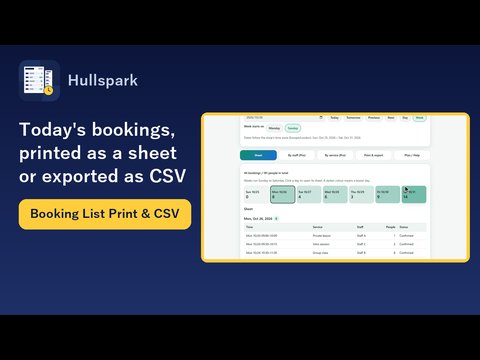
I make a Wix app for this, Booking List Print & CSV by Hullspark. What it does:
- Date, time, service, staff and head count. The CSV columns are Date, Start, End, End date, Service, Staff, People and Status (cancelled bookings are not exported, so Status reads Confirmed). On the Pro plan you choose which columns to write; the free plan writes the standard set for one day.
- A period. On the Pro plan, export a day, a week or a period of up to 31 days. A booking is counted on the day it starts, in the shop's own time zone.
- A file a spreadsheet opens. Accents read correctly when it is opened in a spreadsheet, and any cell that starts with = + - or @ gets a leading apostrophe so it is not run as a formula. Cells with commas or quotes are quoted.
- No customer details. The app reads the date and time, service name, staff name and head count only. No customer names, phone numbers or emails are in the file, and the file is made in your browser.
The head count is blank when Wix does not report one. The service and staff names appear as written in the Wix calendar events. The app reads bookings and changes none of them.
Questions
How do I export Wix Bookings to CSV?
Two ways: the Export icon on the Booking List [1], or Manage > Export booking data in the Booking Calendar [2].
Why is my Wix Bookings CSV empty?
Check the date range has bookings. In a forum thread a reply found that all sessions in the range had 0 participants, so the bookings list was empty, and pointed to the staff hours report for the sessions [3].
Can I choose the columns in Wix's export?
Not in the Calendar's report: its fields cannot be added or removed [2].
Is there a limit on how long a period the app can export?
Yes, 31 days at a time, on the Pro plan.
Does the exported file include customer emails and phone numbers?
Wix's Calendar report does [2]. The app's CSV does not: it never reads them.
What I have not verified
The Wix claims on this page come from the Wix help center articles and forum threads below, read on 2026-10-29. Forum posts are single users' reports, not Wix statements, and I did not reproduce them.
I have not opened the app's CSV in every spreadsheet program. On a dev site I checked appointments, not a class with several participants. I could not tell whether the misaligned file in the 2025 thread came from the address field.
Sources
- [1] Wix Help Center: Wix Bookings: Managing Bookings with the Booking List: https://support.wix.com/en/article/wix-bookings-managing-bookings-with-the-booking-list
- [2] Wix Help Center: Wix Bookings: Exporting Reports on Bookings and Staff from Your Booking Calendar: https://support.wix.com/en/article/exporting-reports-on-bookings-and-staff-in-wix-bookings
- [3] Wix forum: Had set bookings in calendar, exported it in CSV format, but it is not visible (2020): https://forum.wixstudio.com/t/44822
- [4] Wix forum: Monthly Bookings Report (2023): https://forum.wixstudio.com/t/53663
- [5] Wix forum: CSV export from bookings are not aligned in a string (2025): https://forum.wixstudio.com/t/74891
Related
- How to print each staff member's daily schedule from Wix Bookings
- How to print your Wix Bookings list or export it to CSV
- Product page
- All English guides
Checked 2026-10-29. Menu names follow the Wix help center articles above and were not checked on every plan or screen. Wix is a trademark of Wix.com Ltd. This page and the app are not affiliated with, made by or endorsed by Wix.
Questions? Support or support@hullspark.com. Privacy policy