 Hullspark
How to print packing slips for multiple Wix orders at once
You have a day of orders to ship and Wix wants you to open each one to print its packing slip. Here is what Wix offers, where it stops, and one way to get a packing list for every order at once.
Hullspark · 2026-10-29
Short answer
- Wix prints a packing slip from inside one order. In the dashboard you open Orders, select an order, click the More Actions icon and choose Print packing slip [1]. The help article describes it one order at a time and does not say you can print slips for several orders together.
- The Print Orders button prints the orders you ticked. You select one or more orders on the Orders tab and click Print Orders [1][2]. One store owner wrote in 2021 that this bulk print carried prices and images, so it was not the slip they wanted [3]. Wix may have changed the printout since: a user wrote in January 2026 that custom fields now print on it [7].
- You cannot change the printed order page. Wix says it is not possible to customize it, and suggests exporting a CSV instead [5].
- An app can make a packing list for every ticked order in one file. See the app section.
The figure shows the gap. Wix has a slip for one order, and the Print Orders button prints orders in bulk. Wix’s help does not describe a way to print slips for many orders at once.
What Wix lets you do
- Print one slip. Go to Orders in the dashboard, select an order, click the More Actions icon, choose Print packing slip, then click the Print icon and Print [1]. The slip shows the order number, the shipping and billing addresses, the products bought and your store policies. It is not available for dropshipping or digital orders [1].
- Print the orders in bulk. On the Orders tab tick the boxes beside the orders you want and click Print Orders [1][2]. The help articles do not say what the printout contains.
- Export a CSV. Select the orders, click Export and pick the layout “Item purchased” or “Orders”. “Item purchased” gives each bought item its own row, and “Orders” gives each order one row [6]. You can print the sheet, but it is a table and not a slip per parcel.
Menu names change, so check them in your own dashboard.
Where this stops
- One order at a time. A forum post from August 2025 asks for exactly this: bulk print packing slips instead of opening each order. The poster knows orders can be bulk printed but needs packing slips [4].
- Prices and images on the bulk print. A feature request from 2021 says a client with over 100 orders a day had to open each order, because the bulk print from the orders page included prices and images they did not want. A reply said the request would be passed to the team, with no date. In July 2024 another user asked if it had been added [3].
- No layout control. Wix says the printable order page cannot be customized [5].
If you want it in one file
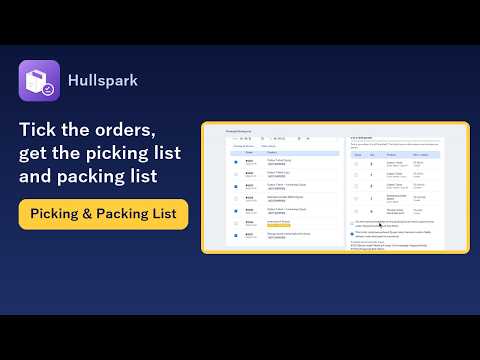
The app Picking & Packing List adds a page to your Wix dashboard. Under “1. Orders waiting to ship” it lists orders not yet shipped and partly shipped ones, newest first. You can filter by date, shipping status, order number, product name or SKU, and tick the orders you will pack. Cancelled, payment-failed and archived orders are not listed, and up to 1,000 orders are loaded.
Under “3. Get the files” the card “Packing list per order” gives you a packing list for each ticked order. The PDF is A4 (a US printer will scale it to Letter) and has one block per order with the order number, the date, the contents and a check box for each item. The CSV holds the same data as one table with a row per item, and has no check boxes. For a partly shipped order the part not yet shipped is listed. If the app cannot tell how many were already shipped, it lists the full count and marks it “Partly shipped - check the count”. It has no prices, so it is a checklist and does not replace an invoice.
Names and addresses are printed only if you tick “Put the name and address on the packing list”. What the customer typed (buyer note, checkout custom field answers, delivery note and text typed on a product) is printed with labels unless you untick “Print what customers entered”. The app only reads your orders. It does not mark anything as shipped, and order data is not stored. The PDF and CSV are made on your device. The free plan lets you choose up to 20 orders per list and Pro has no limit. The PDF and the CSV are both free.
See it on the Wix App Market Product page for the app
Questions
Can Wix print packing slips for several orders at once?
Wix’s help article describes printing a packing slip from inside one order, and does not say you can print slips for several. The Print Orders button prints the orders you ticked, One store owner wrote in 2021 that it carried prices and images. A user wrote in January 2026 that the printout has since changed.
What does the Wix packing slip show?
The order number, the shipping and billing addresses, the products bought and your store policies. It is not available for dropshipping or digital orders.
Does the app’s packing list show prices?
No. It shows the order number, the date, the contents and check boxes. It does not replace an invoice.
Are customer names and addresses printed?
Only if you tick the option to put the name and address on the packing list. The picking list never has them, but what customers typed (a gift message, for example) can include a name.
Does the app mark orders as shipped?
No. It only reads orders and does not change them.
How many orders can I print at once?
On the free plan up to 20 orders per list. Pro has no limit. Up to 1,000 orders are loaded.
Not verified
I read the Wix Help Center and the Wix Studio forum on 2026-10-29. I did not click through these steps in a live Wix dashboard, and I could not see what the Print Orders printout contains. The 2021 description may be out of date. I read every post in the forum threads. They are not official Wix documentation. Wix may have added bulk packing slips since those posts. Dates on the app’s lists and in its date filter follow Japan time, so most US orders placed after the morning show the next day’s date. In the name-and-address option, a US address is printed without the state. The description of the app follows its code as of 2026-10-29. Wix screens and features change.
Sources
- [1] Wix Help Center, Wix Stores: Fulfilling Store Orders: https://support.wix.com/en/article/wix-stores-fulfilling-store-orders
- [2] Wix Help Center, Wix Stores: Updating Multiple Store Orders at Once: https://support.wix.com/en/article/wix-stores-updating-multiple-store-orders-at-once
- [3] Wix Studio community forum, "#featurerequest bulk download of packing slips" (Mar 2021, reply Jul 2024): https://forum.wixstudio.com/t/featurerequest-bulk-download-of-packing-slips/45584
- [4] Wix Studio community forum, "Is there a way to bulk print packing slips instead of having to go into 1 order at a time?" (Aug 2025): https://forum.wixstudio.com/t/is-there-a-way-to-bulk-print-packing-slips-instead-of-having-to-go-into-1-order-at-a-time/73033
- [5] Wix Help Center, Request: Customizing the Printable Order Page: https://support.wix.com/en/article/request-customizing-the-printable-order-page
- [6] Wix Help Center, Wix Stores: Exporting Orders: https://support.wix.com/en/article/wix-stores-exporting-orders
- [7] Wix Studio community forum, "Wix Order Print Changes - Love/Hate" (Jan to Aug 2026): https://forum.wixstudio.com/t/wix-order-print-changes-love-hate/75924
Related
- How to get one pick list for all your unfulfilled Wix orders
- Print gift messages, buyer notes and custom fields on Wix packing slips
- Product page for the app
- All English guides
Wix is a trademark of Wix.com Ltd. This page and the app are not affiliated with, made by or endorsed by Wix.
Questions? Support or support@hullspark.com. Privacy policy