 Hullspark
Can the Wix Bookings calendar show how many spots are left?
You run classes in Wix Bookings and want visitors to see how many places are left before they pick a date, so a group does not click through to find the class is nearly full.
Hullspark · 2026-10-30
Short answer
- The Booking Calendar does not show spots left. The Class Timetable does. In a March 2025 thread a Wix Bookings team member replied that available spots can be shown through the Class Timetable but that this is not yet supported on the Calendar, and that the request went to the backlog [1].
- Wix's Help Center lists the same request as a feature request and notes that a Class Timetable can show the number of available spots [2].
- The timetable and the daily agenda show classes by the week or the day. For the seats left across a whole month, there is an app (below).
What Wix shows on its own
- Weekly Timetable. You choose the details shown for each session, and the list includes the number of spots left and the registration status. The button text follows the status, for example Book now, Join Waitlist or Full [3].
- Daily Agenda. You choose which elements to include, such as the number of slots remaining [4].
Limits Wix states: the Weekly Timetable shows only the first 100 class services, and it is not yet available in the Wix Harmony Editor [3]. The Daily Agenda page says classes at your business location appear, and that courses, appointments and classes at custom or client locations do not [4].
The workaround
If you need spots left on your site today, put a Weekly Timetable or a Daily Agenda on the page and turn on the spots-left detail, instead of relying on the Booking Calendar. In the forum thread the site owner noted the Daily Agenda already has this feature [1]. Both views list classes by the week or the day, and neither lays the month out as a grid.
If you want it for the whole month
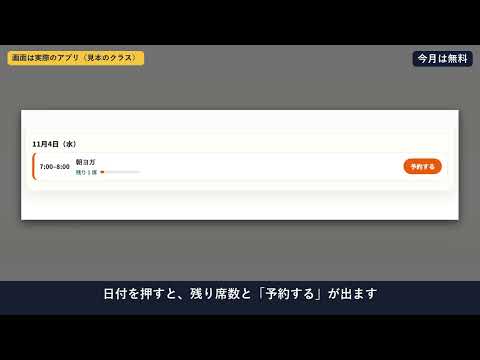
There is a Wix app for the month view, Month Calendar for Bookings. You place its widget on a page in the Wix editor. Each day in the month grid shows the time and name of its classes. Tap a date and that day's list opens with the seats left, and classes with room link to their booking page when the class has one. On a narrow screen the days get coloured dots instead.
The seat count comes from Wix when the month loads, and the visitor's browser keeps a loaded month for up to 3 minutes, so a figure can be a few minutes behind a booking made just now. Free shows the current month and one class. Pro lets visitors move up to 12 months ahead and shows several classes at once, colour-coded in 8 colours. The widget has settings for the week start, hiding full classes, the language and light or dark.
- Classes only. One-to-one bookings and courses are not shown.
- It needs Wix Bookings. Booking and payment still happen in Wix Bookings.
- It reads class names, times, seats left and booking page links. It does not read customers or the people who booked.
See it on the Wix App Market Product page
Questions
Can the Wix Bookings calendar show how many spots are left?
Not as of 2026-10-30. A Wix Bookings team reply says available spots can be shown through the Class Timetable but are not yet supported on the Calendar.
Which Wix views show spots left?
The Weekly Timetable lists the number of spots left among its session details, and the Daily Agenda can show the number of slots remaining. Both are in Wix's Help Center.
Does the app show how many seats are left?
Yes. Tap a date in the month grid and that day's classes open with the seats left. Classes with room link to the booking page.
Can it hide full classes?
Yes. The widget has a setting to hide full classes.
Sources
The Wix forum reply is from March 2025 and the Help Center pages give no update date. Wix changes its views, so check the pages below for the current state.
- [1] Wix Studio community forum, "Wix Booking Calendar" (2025-03-26, Wix Bookings team reply 2025-03-30): https://forum.wixstudio.com/t/wix-booking-calendar/69921
- [2] Wix Help Center request, "Displaying Available Spots for Classes", checked 2026-10-30: https://support.wix.com/en/article/request-displaying-available-spots-for-classes-in-wix-bookings
- [3] Wix Help Center, adding and setting up a Weekly Timetable, checked 2026-10-30: https://support.wix.com/en/article/wix-bookings-adding-and-setting-up-a-weekly-timetable
- [4] Wix Help Center, adding and setting up a Daily Agenda on your site, checked 2026-10-30: https://support.wix.com/en/article/wix-bookings-adding-and-setting-up-a-daily-agenda-on-your-site
Related
- Does Wix Bookings have a monthly calendar view for classes?
- How can I show all my Wix Bookings classes for the whole month?
- Month Calendar for Bookings
- All English guides
Wix is a trademark of Wix.com Ltd. This page and the app are not affiliated with, made by or endorsed by Wix.
Questions? Support or support@hullspark.com. Privacy policy